Step-By-Step Guide For Setting Up the Bitmain Antminer S19j Pro 104th
Let's discuss each steps in detail, sharing all the technical details with screenshots to set up the bitmain antminer S19j Pro 104th.

What to Expect in the Shipment Package?
- This is how you will receive the Antminer S19j Pro 104Th in a typical Bitmain box from MinerHaolan.
- The machine is safely padded with foam pieces for better protection. As you open it, you will see a quick start guide to help you use the miner.

- As you remove the foam, you will find the entire machine perfectly wrapped in an antistatic bag and foam underneath for safe shipping.
If you order Antminer S19j Pro 104Th from a reputable site like MinerHaolan, you will get the hardware within 3-4 business days. MinerHaolan is transparent in its cost and has no hidden charges. For instance, all the charges listed on the website include shipping and taxes.
However, the price of any mining hardware is subject to change. You can always check the latest price of the hardware from our website.
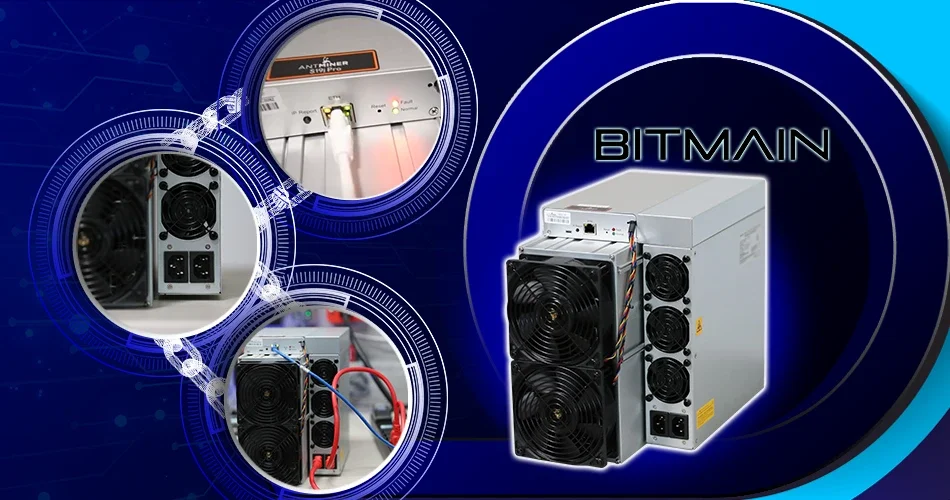
The Antminer S19j Pro 104Th currently comes in two different looks. One is the same as the typical Antminer series, as shown in the following picture.
The other comes with a protective metal cover, as shown in the following picture.
You can find all the technical information of the device on its label.
Steps to Set-Up the Bitmain Antminer S19j Pro 104Th
1. Downloading the IP Reporter
- Go to Bitmain’s support page. Select "Others" on the left under "Firmware List", and then select "IP reporter" on the right.

- Click on the Download button.

- Save the downloaded file in your preferred location on your computer.

- Go to the downloaded file and extract the zip file.


- Now go to the extracted file and right-click it. Choose the option “ Run as administrator”.
- Upon clicking, you will see the below screen. Click YES.
- The below screen will pop up.
2. Connecting the IP reporter to Antminer S19J Pro
- Before proceeding further, ensure your computer or laptop is connected to the same WiFi network that your LAN cable is plugged onto your S19J Pro.
- Click the start button. You may receive a Firewall notice. Click “Allow Access”.
- Now the IP reporter is ready to find the ASIC miner. Click on the IP report button on your S19j Pro and hold it for 5 seconds.
- Once you let go of the IP report button, you can see the lights flashing.
- Now, your computer screen should show a confirmation message listing the IP address. Hit the OK button.
3. Accessing the S19j Pro via the Web Browser
- Open a new tab in your browser and enter the IP address.
- Hit the ENTER button. A window will pop up asking for a username and password.
- The default username and password for S19j Pro is “root.” However, in other models from different companies, the credentials may vary. You can reach us at info@MinerHaolan.com for assistance.
- Now you can access the Web GUI of the Antminer S19j Pro+.
4. Selecting the Mining Pool
- Go to https://miningpoolstats.stream/bitcoin. You will find the list of mining pools available for Bitcoin mining. Do your research and select the mining pool that best suits your mining needs.

- Now, create an account with that mining pool. Here, we will illustrate how to make a sub-account with the mining pool, poolin.com.

- Go to the Pool Account. Then click on the “Sub-account Manage.”


- Create a sub-account by giving your preferred name. (Use all lowercase letters). Select the coin for the sub-account that is BTC.

- Now select the withdrawal address to receive your mining rewards. Selecting the “Recieve with Mining Pool Account” option is ideal as you can withdraw your rewards anytime.

- After entering all the details, hit the CREATE button. Now you have your mining account.

5. Adding the Miner Configuration
- Go to the Web GUI of the Antminer S19j Pro+. Click on the SETTINGS tab. You should fill in the mining address, miner name and password.
- You can simply copy and paste the details as shown below. Copy the url1, url2 and url3 addresses and paste them on pool1, pool2 and pool3 addresses.
- You can paste the same worker’s name on all three miner names.
- Enter the password as 123 on all three rows.
- Click on SAVE after entering all the details.
- You’re all set to mine Bitcoins from the mining pool.
6. Start Mining Bitcoin
- You can check the Antminer’s dashboard after a few minutes to know the mining status. The mining process should have started. It is advisable to reboot the computer to know the actual readings.
- You can see the Antminer S19j Pro mining at its maximum hash rate of around 104Th/s.

7. Withdraw Bitcoins
- You can withdraw anytime as you mine Bitcoins and gain rewards in your wallet. Simply go to your pool account.

- Withdraw Bitcoins onto your Bitcoin wallet by giving its address.


Power Infrastructure Requirements for Bitmain Antminer S19j Pro 104Th
You will need the following setup to power your Antminer S19j Pro 104Th.
- 30 amp 240V Circuit Breaker
- 10 gauge wiring
- 30 amp receptacle
- 2 sets of C-13 to C-14 power cables
- A PDU
It is recommended to take a certified electrician’s help to have this power infrastructure set up for your S19j Pro 104Th.
Bitcoin Price Prediction
Bitcoin price plays a vital role in Bitcoin mining profitability. The higher the Bitcoin prices, the better the profitability. Though we can’t predict any cryptocurrency’s price precisely, here is what the experts predict about Bitcoin’s price. An expected price graph of Bitcoin for your quick reference.

Source: Changelly